Preprocesing Spatial Data
This section refers to the use of schimpy’s prepare_schism utility, which is a powerful preprocessor for preparing the mesh and spatial data for your model run. The preprocessor can be used to apply templates, modify existing runs, and configure input parameters through YAML files. It is a key part of the workflow for setting up and running the Bay-Delta SCHISM model, and is designed to be flexible and user-friendly.
When to use the preprocessor
We recommend using the preprocessor whenever you are setting up a new model run, especially if you are making changes to the mesh or spatial inputs. The preprocessor helps ensure that all necessary files are generated correctly and consistently, and can save time and reduce errors compared to manually preparing these files.
By using the up-to-date template files (found in BayDeltaSCHISM/templates/bay_delta), you can be confident that you are using the most current and validated spatial inputs for your model run. The preprocessor also allows you to easily modify and customize these inputs as needed for your specific modeling scenario.
If you already have a model run set up and you’re simply changing some of the timeseries inputs (e.g. changing the boundary flows), or if you’re just running a simulation from a different start date, you may not need to use the preprocessor. In these cases, you can simply modify the relevant input files directly in the alternative simulation directory (e.g. modifying the flow boundary file or the hotstart file) without needing to run the preprocessor again. However, if you are making changes to the mesh or spatial inputs, or if you’re unsure about whether you need to use the preprocessor, it’s generally a good idea to run it to ensure that all necessary files are generated correctly.
Running the preprocessor
The preprocessor is run using the prepare_schism command line utility. This utility takes care of running the necessary steps to prepare the mesh and spatial data for your model run based on the configuration specified in your YAML files. It requires one input which is the path to the main YAML configuration file (e.g. main_bay_delta.yaml), which contains references to all of the necessary input files and parameters for the preprocessor to generate the required outputs.
Applying the template
Partial preprocessing for modification
Configuring the input (yaml)
Where to? Required files and directory structure
Need to complete
Volumetric Refinement and Smoothing, Depth Enforcement
Overview
The volumetric refinement and smoothing procedure lightly adjusts mesh bathymetry to improve:
Volume fidelity — better alignment between mesh element volumes and DEM reference.
Smoothness — elimination of single-node pits and sharp valleys that degrade numerical stability.
Typical changes are small (0.1–0.2 m), but isolated pits may be smoothed more. A shoreline regularization step prevents accidental drying of tidally wetted areas. After refinement, depth enforcement ensures hydraulic features such as channels and levees are properly represented where DEMs are incomplete. Removing unresolved dips and pits also helps prevent switching in the numbers of levels in a local sigma coordinate mesh, which reduces undulation in the vertical grid. For the most part these settings are “set-it-and-forget-it”. For a Bay-Delta mesh we provide reasonable defaults in the preprocessor.
The method is available both as a standalone script and as an integrated step in the BayDeltaSCHISM preprocessor.
Mathematical Formulation
Volume fidelity:
Smoothness (total variation):
Combined objective:
where:
\(\lambda_{L2}\) controls the weight on volume fidelity.
\(\mu\) (often referred to as
tv_weight) controls the weight on total variation (smoothness).
Note
The weights are chosen so that the two terms are balanced on comparable
scales. In practice, this means adjustments to \(\lambda_{L2}\),
tv_weight, and l2_weight are the most meaningful levers, but these
are rarely changed once defaults are tuned.
The TV term is non-differentiable at zero. In practice a subgradient is used: rather than a true slope, it provides a proxy direction (raise or lower a node) that reduces roughness. This simple but powerful idea allows TV regularization to work in large-scale mesh optimization.
Depth Enforcement
Following smoothing, targeted enforcement rules may be applied:
Maximum depth (carve channel):
\[h_i = \min(h_i, h_\text{max,poly})\]Minimum depth (protect levee crest):
\[h_i = \max(h_i, h_\text{min,poly})\]
These adjustments are applied within polygons or along polylines defined in the YAML configuration.
Shoreline Discovery Seeds
As part of the shoreline regularization process, seed points are used to identify wetted areas that should remain connected to open water.
For the Bay-Delta domain, default seeds are already embedded in the code (specified in UTM coordinates).
For other domains, users must explicitly supply seeds in deep, reliably wetted areas and update the
epsgfield to match their coordinate system.
This ensures that shoreline constraints are applied consistently during the refinement process.
Preprocessor Integration
In the BayDeltaSCHISM preprocessor, this step is configured under the
grid: section. Parameters are usually factored into a separate file and
included using the extended YAML !include syntax.
Example:
grid:
  href:
    name: href.gr3
    default: 0.0
    smooth: true

  depth_optimization:
    method: volume_tvd
    include: depth_opt_params_volume_tvd.yaml
Inline Parameters (Annotated)
The included file depth_opt_params_volume_tvd.yaml contains tuned defaults.
For clarity, the main options are shown below with short annotations.
# Target CFL-like condition for stability (0.5–1.0 typical)
cfl_target: 0.9

# Initial timestep size for iterations
dt_init: 1.0

# Number of optimization iterations
niter: 25

# Weight for prioritizing progress on volume fidelity
lambda_l2: 1.0

# Weight of total variation (smoothness) term
tv_weight: 0.5

# Optional additional L2 regularization weight
l2_weight: 0.1

# Clipping tolerance (null disables clipping)
clip_eps: null

# Logging level (INFO or DEBUG)
log_level: INFO
Both this file and the top-level templates (such as
main_bay_delta.yaml) are included in the standard BayDeltaSCHISM
distribution.
Examples
Figures below illustrate typical applications.
Sacramento River and Threemile Slough
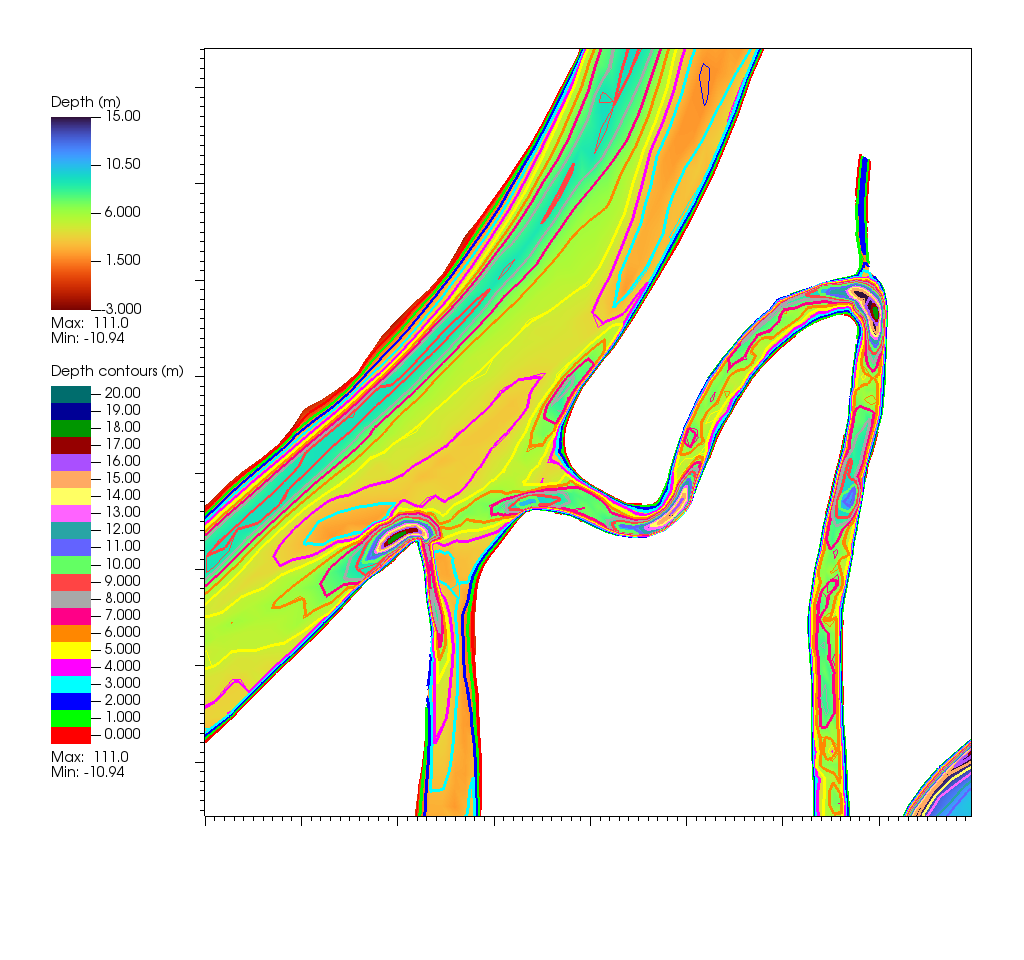
Fig. 1 Optimization removes isolated pits and improves smoothness. Pre-optimization contours are light, post-optimization heavy.
Middle River and northern Mildred Island
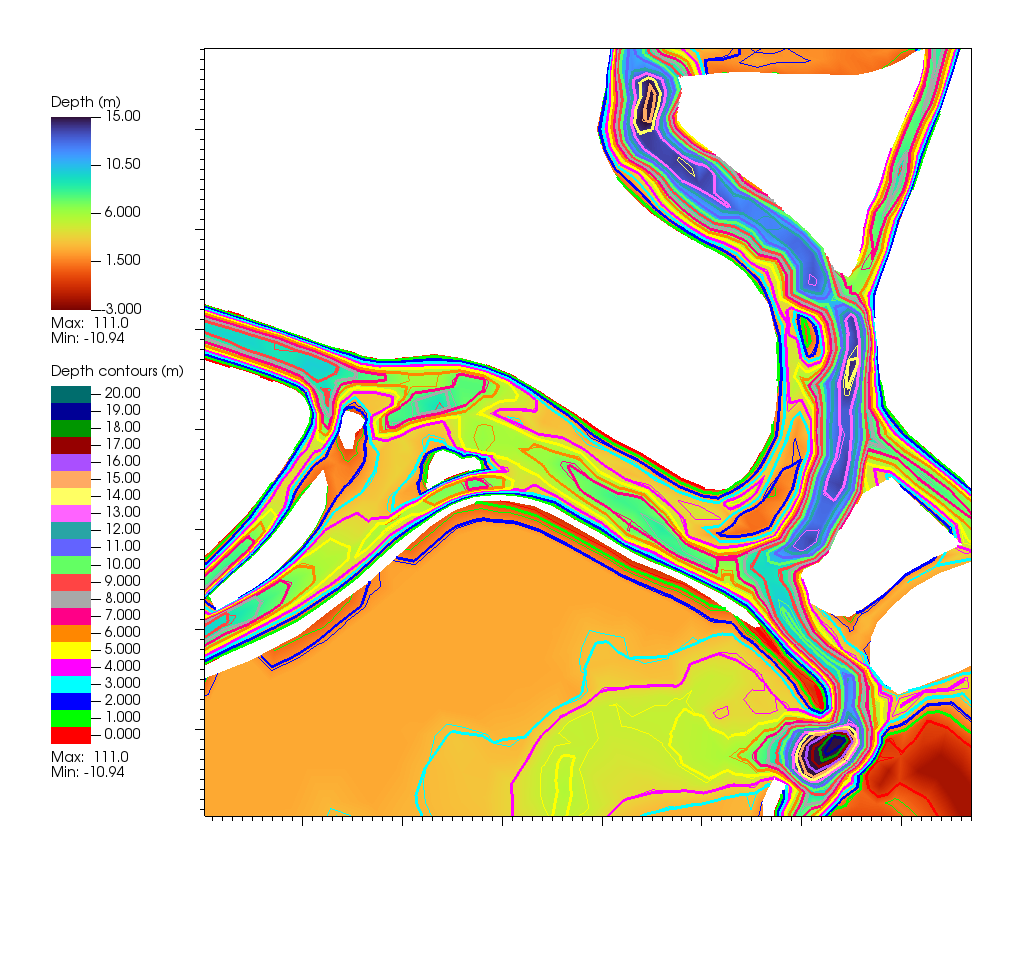
Fig. 2 Improved volume fidelity and channel continuity. Pre-optimization contours are light, post-optimization heavy.